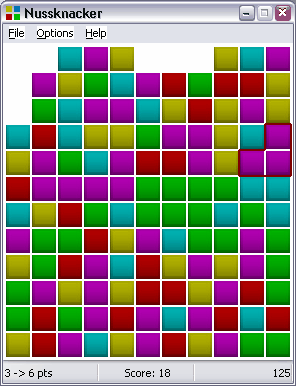
The rules of NussKnacker are simple: click on color groups to get points. The bigger the group you can click away, the more points you get.
Menu File
New Game
Start a new game using the current options
Open Game...
Open a saved game.
Save Game...
Save the current game in a file. The score, the current options and the history of the moves are saved with the board.
Replay Game
This command allows you to replay the game from the start.
Undo
Undo the last move.
Redo
Redo the last "undoed" move
Exit
Quit the game. The board, the score, the current options, the statistics and the move history are saved in the file named "nussknacker.ini".
Menu Options
Sub-menu Size
Three built-in sizes: small (11x12) medium (16x17) and big (21x22).
The "Custom..." command allows you to fix other dimensions (from 6 up to 29 units) but your score will be saved in the unique category dedicated to customized games.
Sub-menu Level
NussKnacker allows three different levels: easy (3 colors) standard (4 colors) and difficult (5 colors).
Sub-menu Shape
NussKnacker offers four different built-in shapes: rectangles, small rectangles, balls and small balls. The "Custom..." command allows you to use the five user-defined bitmaps (ball1.bmp, ball2.bmp, ball3.bmp, ball4.bmp and ball5.bmp). It is up to you to design these five images as you like, provided that the five images should be five squares strictly equal in width and height. The NussKnacker window is automatically resized according to the dimensions of your bitmaps.
Sub-menu Scoring
NussKnacker allows you to use alternate different scoring methods :
| - | Jawbreaker (n)*(n-1). |
| - | Otis (n-1)*(n-1) |
| - | Same Game ((n-1)*n)-((n-2)*2) |
where 'n' is the number of units in the block.
The default method is based on Jawbreaker. If you choose another one, your score will be saved in the unique category dedicated to customized games.
Menu Help
The "Scores..." dialog shows the ten best scores performed in each of the nine regular categories (the three levels x the three regular sizes). There is a 10th category dedicated to customized games. You have the ability to change your ID. The date of the performance is saved with the score.
The "About..." dialog displays information about the program